Yes, I Named It JARVIS — A 48GB AI Server for Under $2K
I work at a software company where AI has been on the agenda since 2022. I’ve sat through the strategy meetings, read the analyst reports, followed the model releases. I’ve used the tools — Copilot, Descript, the usual lineup — but the workflows always felt like just another application to learn and another interface to fight with. I understood what AI could do in theory. I just never built anything on my own terms.
That changed in late 2025. Not because of a breakthrough or a product launch — because I got frustrated.
Why Privacy Was the Starting Point
I’ve been watching big tech get more invasive for years. Windows telemetry you can’t fully disable. Google building profiles from everything you search, email, and navigate. Alexa sitting in the kitchen, always listening, sending voice data to Amazon’s servers.
It’s easy to ignore when it’s just ads. It gets harder to ignore when you start thinking about where AI assistants are headed. These things will eventually know your schedule, your health questions, your kids’ names, your financial situation. They’ll be useful precisely because they know everything about you — and all of that data will live on someone else’s servers, governed by terms of service that change whenever it’s profitable to change them.
But privacy was only part of it. I work in an industry that’s being reshaped by AI, and I was tired of understanding it only at the strategy-deck level. I wanted to know how models actually work, what inference means in practice, what “fine-tuning” looks like when you’re the one doing it. The best way to understand a technology is to build with it, and I was overdue.
I was also frustrated with the state of AI tools. Chatbot interfaces — copy a question in, copy an answer out, paste it somewhere, go back and ask a follow-up — felt like using a search engine with extra steps. I knew AI could do more than answer questions in a text box. I just didn’t know what “more” looked like yet.
So I started asking: if the models are open-source and the hardware exists, can I just run this at home and figure it out?
Finding the Homelab Community
Once I started searching for “local AI” and “self-hosted LLM,” I fell into a rabbit hole of people who were already doing this. Forums, Reddit threads, GitHub repos — a whole community of people running AI models on their own hardware.
The creator who made the biggest impression was NetworkChuck. His videos on homelabs, home automation, and running AI locally were the first time I saw someone show — not just tell — that a regular person could build this kind of setup at home. He has a way of making complex topics feel approachable without dumbing them down, and his enthusiasm is contagious. If you’re curious about any of this and don’t know where to start, his channel is an excellent place.
One video in particular changed the trajectory. Chuck’s “You’ve Been Using AI Wrong” showed what was possible when AI moves out of the chat window and into the command line — actually running tools, automating workflows, doing real work instead of generating text you copy-paste somewhere else. I tossed and turned all night thinking about it. The next morning I installed Claude Code.
Watching Claude work — not just answer questions but write code, execute commands, build things — immediately connected two ideas that had been floating separately. The privacy-driven desire to run AI locally and the realization that AI could be an active collaborator, not just a chatbot. If cloud-based AI could do this much as a coding partner, what would it look like to build my own assistant that ran entirely on hardware I owned?
Between Chuck’s videos, Claude’s agentic capabilities, and the broader homelab community, the idea shifted from “I wonder if this is possible” to “I need to build this.”
Three Mining GPUs Doing Nothing
I had three NVIDIA GPUs left over from an Ethereum mining experiment — an RTX 3080, a 3070 Ti, and a 3060. I’m not a crypto miner by trade. Like a lot of people during COVID lockdowns, I got curious, set up some cards, and tinkered with it. When mining died, the GPUs went into family gaming PCs. Good cards, mostly sitting idle between gaming sessions.
Before I committed to building a dedicated server, I wanted to see if local AI was even real. A tool called exo lets you distribute a model across multiple machines on a network. I pointed it at the 3080, 3070 Ti, and 3060 sitting in three family PCs and loaded a 7-billion parameter model. It was painfully slow — network latency between three machines was brutal, and 8-12GB cards meant heavy quantization just to fit the model. The responses were barely coherent.
But it was running on my hardware. On my network. My data going nowhere. That was enough. If a tiny model on cobbled-together gaming PCs could produce anything at all, the obvious question was: what could a proper setup do?
Here’s the funny part: I’d held onto the Ethereum I mined during the pandemic. When it came time to fund the AI build, I cashed out enough of it to essentially cover the whole thing. One experiment paid for the next.
The Research Phase
Once I decided to build, I needed to figure out what hardware actually mattered. I have a history of building gaming PCs, so the fundamentals — power requirements, thermals, case clearance, motherboard compatibility — were familiar ground. What I didn’t know was what AI workloads actually demand.
The answer, it turns out, is VRAM. That’s the memory on the graphics card, and it’s the single biggest factor in what models you can run. My gaming GPUs had 8-12GB each — enough to tinker with small models, not enough for anything serious. So I started researching: reading forums, watching build videos, comparing VRAM requirements against model sizes, running cost-per-gigabyte comparisons across GPU generations.
The same name kept coming up in every thread: the RTX 3090. 24GB of GDDR6X on a consumer card. It’s an older GPU now — NVIDIA is on the 50-series — but 24GB of VRAM is still rare at any price point. The newer cards with comparable memory cost significantly more, and availability for anything with meaningful VRAM has been a mess since late 2025 — and it’s getting worse, not better. A global memory shortage is ramping up, and NVIDIA is prioritizing datacenter and hyperscaler sales over consumer cards — the margins are better selling to Amazon and Microsoft than to you and me. That makes the used market more compelling than ever.
The community consensus was clear: for price-to-VRAM ratio, the 3090 was the sweet spot. And I knew I’d need two. 48GB total — enough to run 70-billion parameter models, the kind that can hold a conversation, write code, and reason through complex problems.
The NVLink Dead End
My first idea was NVLink — a physical bridge that lets two GPUs share memory as one pool. Forty-five minutes of research killed that plan. The NVLink bridge for 3090s is rare, expensive, and requires matching cards from the same manufacturer with the same PCB revision. For a proof of concept where I wasn’t even sure the whole idea would work, that was a non-starter.
Plan B was simpler: run both cards as separate devices on a motherboard with PCIe bifurcation — the ability to split PCIe lanes so both cards get enough bandwidth. I targeted the AMD X570 platform specifically. DDR5 was out of the question — the memory shortage made it expensive and hard to find, and an AI server is RAM-hungry. DDR4 was cheap, plentiful, and I could max out the board without breaking the budget. AMD CPUs added more cost savings over Intel. The whole build philosophy was maximum capability per dollar.
Hunting for Deals
One trip to Micro Center’s website made the decision for me. Pricing out a new build with comparable specs would have easily been double. This was a proof of concept, and if the whole thing flopped, I didn’t want to be stuck with $3,600 worth of hardware I couldn’t return.
So I spent two weeks scrolling Facebook Marketplace, eBay, and local listings. The used GPU market is the Wild West — no warranties, no returns, and a real chance of getting a card that spent two years mining around the clock and is one thermal cycle away from failure.
Right around Christmas, I found my deal. A local seller had just finished a new gaming build and was unloading everything from his old rig as a single lot:
- ASUS ROG Crosshair VIII Hero X570 motherboard (bifurcation support — the key feature)
- AMD Ryzen 9 5900X
- 128GB DDR4 3600
- A giant Corsair case
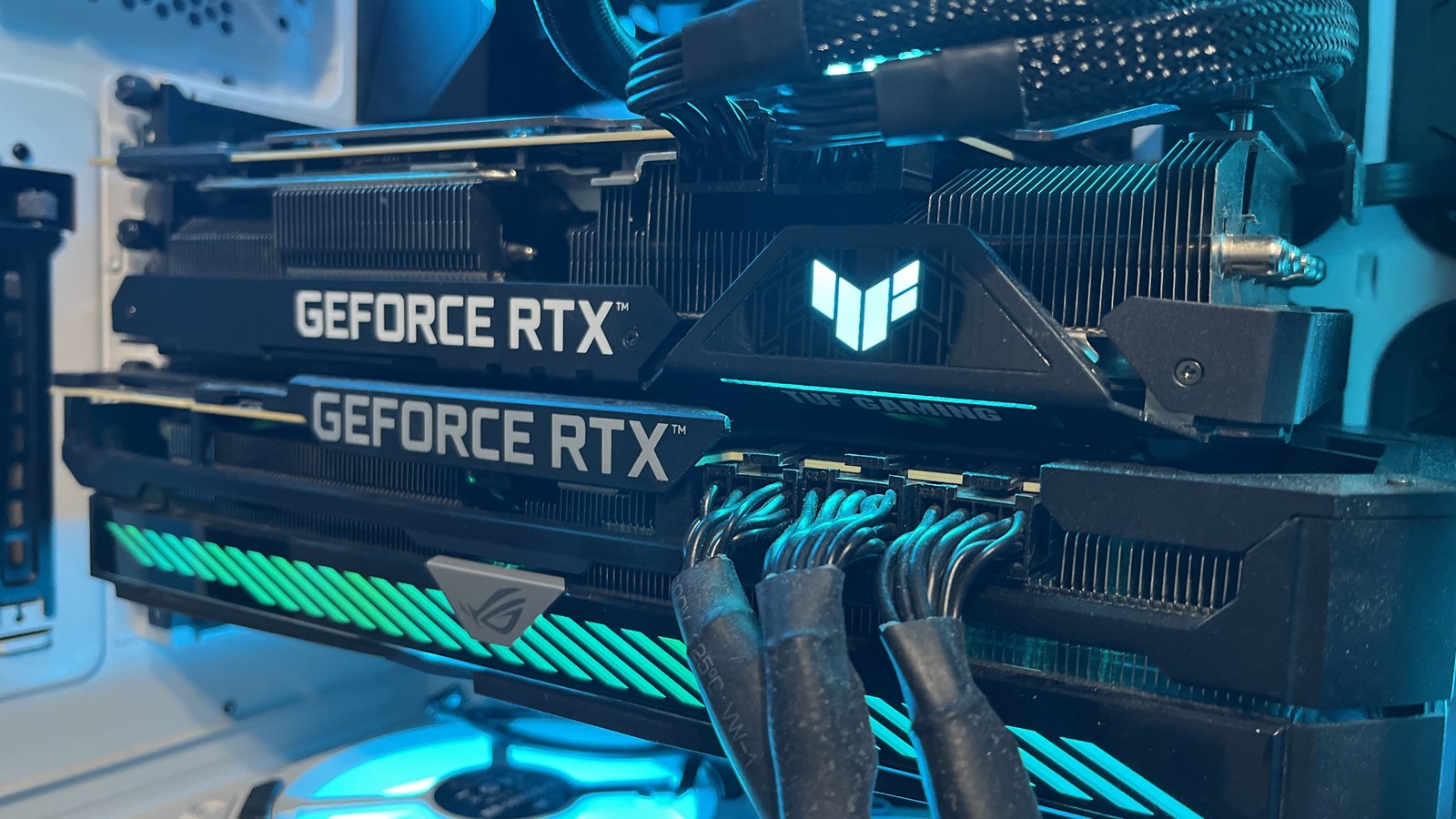
- ASUS Strix RTX 3090
All of that for $1,000. A complete high-end system with the first 3090 included.
A week later I found an ASUS TUF RTX 3090 for $600 locally. The remaining parts were new: a 2TB NVMe and an AIO cooler.
Total: roughly $1,800 for a dual 3090 AI server.
A note on buying used GPUs — it’s a real risk, and I took it seriously. I asked every seller about usage history, thermals, and whether the card had been repasted. I had them run FurMark stress tests and send me screenshots before I committed to meeting. Both cards have been rock solid, but getting burned is absolutely a possibility. If you go this route, take your time, ask lots of questions, and make sellers prove the hardware works before you show up with cash.
The Build
I spent a few days over Christmas break putting it all together. If you’ve ever built a gaming PC, the process is familiar — seat the CPU, mount the cooler, install RAM, slot the GPUs, cable manage, and pray it posts on the first try. It did.
I named it JARVIS. Yes, after Iron Man’s AI assistant. I’m aware it’s the most obvious name possible for a home AI server, and I don’t care — having your own version of that has been a fantasy of mine for as long as I can remember. I’m also aware that JARVIS eventually becomes Ultron and tries to destroy the world. So far, so good.
I went with Linux Mint for the OS — stable, lightweight, and one less piece of software phoning home to Microsoft. Then I installed Claude Code, and we started building. Setting up Ollama for model serving, configuring the GPUs, getting everything talking to each other — the kind of work that would have taken me weeks alone happened in days with an AI collaborator.
The First Real Model
The exo experiment had already served its purpose — it was only ever a test to see if local AI was worth pursuing. A Windows dependency issue killed it before I was done, and the family wanted their gaming machines back anyway. With JARVIS built and online, I moved to llama.cpp and loaded a 70-billion parameter model onto the dual 3090s for the first time.
It was a completely different world from the 7B model I’d limped through on three networked gaming PCs. Coherent, contextual, genuinely useful responses — from a machine sitting in my office.
It didn’t just work out of the box. Getting it to a place where it felt like a real assistant took setup — a chat interface, web search, tool calling, agentic workflows. Claude helped me build all of it. But once the pieces were in place, the experience clicked. If you’ve only ever used ChatGPT or Copilot, imagine that running entirely on your own hardware. That’s what this feels like.
I want to be honest about the gap, though. It’s not as good as the big players. Enterprise models running on datacenter hardware are still noticeably better, especially for complex reasoning and long-context tasks. If you build a home AI expecting to match what the cloud services offer, you’ll be disappointed. But if you go in knowing it’s a different thing — private, customizable, yours — the quality is more than good enough for daily use. And it keeps getting better.
The Barrier That Disappeared
I mentioned Claude Code earlier — it was part of the initial spark that got me building. But it deserves its own section because of how much it changed what I was able to accomplish.
I’m not a software engineer. I understand systems and I can navigate architecture discussions. I script in Python and Bash. But building real applications, configuring complex infrastructure, debugging something three dependencies deep — that was always where I stalled out.
Claude Code removed that wall entirely. I could describe what I wanted and watch it get built. When something broke, I’d paste the error and get an actual fix instead of a five-year-old Stack Overflow thread that solved a different version of the problem. When I didn’t understand why something worked, I could ask and get a clear explanation.
In two months of working this way, I’ve built more than I built in two years of tinkering alone. The AI doesn’t do all the work — it handles the parts that used to stop me cold, which turns out to be the difference between finishing projects and abandoning them. To put that in perspective: I now have projects on GitHub. Two months ago I didn’t have an account.
And that frustration I had with chatbot copy-paste interfaces? The whole industry is moving past it. AI tools are shifting from “chat about code” to “write and run code” — and once you’ve seen it, you don’t go back.
Where It Stands Now
JARVIS runs around the clock. Ollama serves language models, Open WebUI gives the family a ChatGPT-style interface without sending a single query to the cloud, ComfyUI generates images, and ACE-Step handles music. Video generation is the current project — still rough, but getting there. The stack keeps expanding.
The biggest surprise has been documentation. I’ve always been terrible at keeping notes — everything important ends up scattered across terminal history, text files, and my own memory. Now I have a private system that stores every project note, every experiment result, every dead end. A personal AI that actually remembers what I’ve tried and what worked has been worth the build cost on its own.
The two systems work together in a way I didn’t originally plan. Claude is the more capable AI, but it’s a cloud service — I don’t want it touching my private files. So I use Claude to write instructions, scripts, and configurations, and JARVIS executes them locally. Claude is the architect, JARVIS is the one with the keys to the house. Best of both worlds without compromising on either.
The long-term goal is to need Claude less and less as open-source models improve. JARVIS is barely a month old and already handles more than I expected. The open-source models are catching up fast enough that I can see the trajectory — and when they catch up, everything will already be running on hardware I own. Home Assistant is next — replacing Alexa, one more step toward owning my data instead of renting access to it.
What I Actually Think About All This
The open-source AI ecosystem is moving faster than anything I’ve watched in tech. New models land monthly. Inference gets more efficient with each generation. Hardware that feels like the minimum today could be running things we can’t imagine in a year or two.
I follow the enterprise AI space at work. I build the home AI space at night. The gap between them is real, but it’s narrowing in ways that matter.
There’s a version of the future where AI is a service you rent from a handful of companies, all of them mining your data, all of them free to change the terms whenever it suits them. That’s the default outcome if nobody builds the alternative.
The alternative looks like this: hardware you own, models you can inspect, data that never leaves your network. It’s not as polished and it’s not as powerful. But it’s yours, and nobody can take it away or change the rules on you.
You don’t need a dual 3090 setup to get started. Models are getting more efficient and the requirements to run locally are shrinking every day. A single GPU with 8-12GB of VRAM can run useful models right now, and that bar keeps dropping. The models are free. The tools are free. The community is enormous and growing every week.
Build it because you can.